

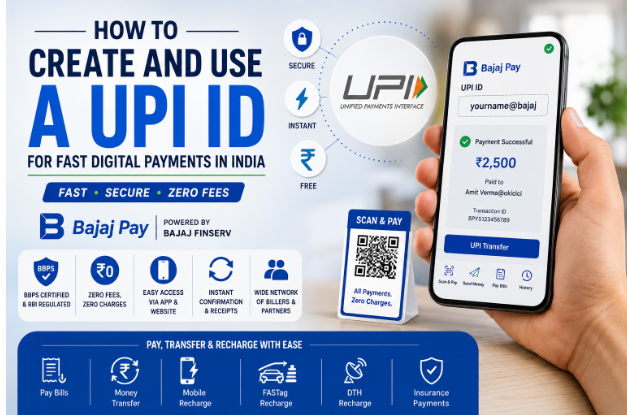
Creating and using a UPI ID is essential for anyone wishing to make fast digital payments in India. Unified Payments Interface (UPI) streamlines the transaction process, allowing users to transfer money instantly and securely. Bajaj Pay, available on the Bajaj Finserv App and website, is a BBPS-enabled platform that enhances this experience, making all payments and recharges completely free of charge – zero fees, zero convenience charges.
What is UPI ID and how does Bajaj Pay make it easier?
UPI ID is a unique identifier assigned to users, enabling seamless money transfers via the UPI platform. It’s an indispensable tool in an era where digital transactions are gaining ground. With the rise of online payments, having a UPI ID ensures that you can easily pay bills, do online shopping, or transfer money to friends and family, all using just your smartphone.
Bajaj Pay simplifies the entire process of creating and using a UPI ID. The platform is BBPS-enabled, ensuring a secure and regulated environment for transactions. Bajaj Pay allows you to create your UPI ID hassle-free, and with its user-friendly interface on the Bajaj Finserv App and Bajaj Pay website, managing your payments has never been easier. Best of all, you won’t incur any fees for transactions, making it an economical option for digital payments.
Features of UPI ID on Bajaj Pay
- BBPS-certified and RBI-regulated secure payment platform.
- Zero fees and zero convenience charges on all transactions.
- Accessible via the Bajaj Finserv App and Bajaj Pay website.
- Multiple payment modes including UPI, Net Banking, debit, or credit card.
- Instant payment confirmation with digital receipts.
- Wide network of billers, operators, and service providers.
- Auto-pay option for recurring payments and recharges.
- 24×7 availability for uninterrupted access.
Top 5 service providers for UPI transactions on Bajaj Pay
Paytm
- Category: Mobile Wallet and Payment Gateway
- Geographic coverage: Nationwide
- Notable feature: Offers various cashback rewards for UPI transactions.
PhonePe
- Category: Digital Payment Platform
- Geographic coverage: Nationwide
- Notable feature: Instant money transfer with a user-friendly interface and quick bill payments.
Google Pay
- Category: Digital Wallet and Money Transfer
- Geographic coverage: Nationwide
- Notable feature: Allows users to link multiple bank accounts and transfer money easily.
BHIM App
- Category: UPI App for Government
- Geographic coverage: Nationwide
- Notable feature: Government-backed app with high security, focusing exclusively on UPI transactions.
Mobikwik
- Category: Digital Wallet
- Geographic coverage: Nationwide
- Notable feature: Offers a variety of financial services along with seamless UPI payments.
Things to keep in mind before using UPI for payments
- Keep your registered mobile number handy; it will be necessary for UPI registration and transactions.
- Check the payment due dates to avoid penalties or late fees.
- Verify the details of the biller or payee before confirming the transaction.
- Use the auto-pay feature for recurring payments like utility bills to ensure you never miss a due date.
- Explore the Offers and Rewards section on Bajaj Pay for exclusive cashback on transactions.
- Ensure you have a stable internet connection while making transactions to avoid disruptions.
- Save your digital receipts for future reference or dispute resolution.
- If you are wondering how to create UPI ID for current account, ensure your current account is UPI-enabled and linked to your registered mobile number before starting the registration process.
Benefits of paying through Bajaj Pay
- Zero fees and charges: All payments, recharges, and transfers made through Bajaj Pay are completely free, with no hidden charges or convenience fees at checkout.
- Rewards and offers: Users can earn Bajaj Pay rewards on eligible transactions and access exclusive cashback deals and partner offers from the Offers section.
- Secure and trusted platform: Bajaj Pay is BBPS-certified and backed by Bajaj Finserv’s established financial infrastructure, ensuring end-to-end encryption on every transaction.
- One platform for all payments: Users can manage various transactions, including bill payments, recharges, FASTag, money transfers, and more, without needing to switch between multiple apps.
- Instant confirmation: Every transaction is immediately confirmed, and users receive a downloadable digital receipt for their records.
How to create and use a UPI ID with the Bajaj Finserv App
- Step 1: Open the Bajaj Finserv App on your smartphone or visit the Bajaj Pay website on your browser.
- Step 2: Log in using your registered mobile number or create a new account if you are a first-time user.
- Step 3: Navigate to the “Payments” section on the home screen and select “Create UPI ID.”
- Step 4: Choose your preferred UPI ID, which will include your bank details, and confirm.
- Step 5: Enter any required verification details such as your mobile number. Ensure that your bank account is linked.
- Step 6: Once verified, you’ll receive your UPI ID. You can now use this for payments.
- Step 7: For making payments, select “UPI Transfer,” enter the UPI ID of the recipient, enter the amount, and confirm to proceed.
Conclusion
Using a UPI ID through Bajaj Pay for your digital payments is a transformative experience, characterized by zero fees, high security, and user-friendly interfaces. This innovative platform allows you to enjoy seamless transactions while earning rewards and offers. Embrace the convenience of digital payments today by using the Bajaj Finserv App or visiting the Bajaj Pay website to create and manage your UPI ID effortlessly.formatting the content and maintain heading hirerachy and bullet points and don’t change any word or char




More Stories
Georgia Financial Adviser Christopher Burns Remains Wanted in Fraud Case
Andrea and Kent Shannon Accused in $57 Million Tax Refund Fraud Scheme
What Are the Tax Benefits of Taking a Home Loan? A Practical Guide